Watch Video
Screenshots
Description
Description
AudioSynth 2026, an all-in-one tool designed to add voices to audio and video, create audio descriptions, generate automatic subtitles and dubbing, create spoken tutorials, convert PDFs to speech and edit audio and video, with a strong focus on accessibility for visually impaired people.
Main Features
1. Create Audio Descriptions (main feature)
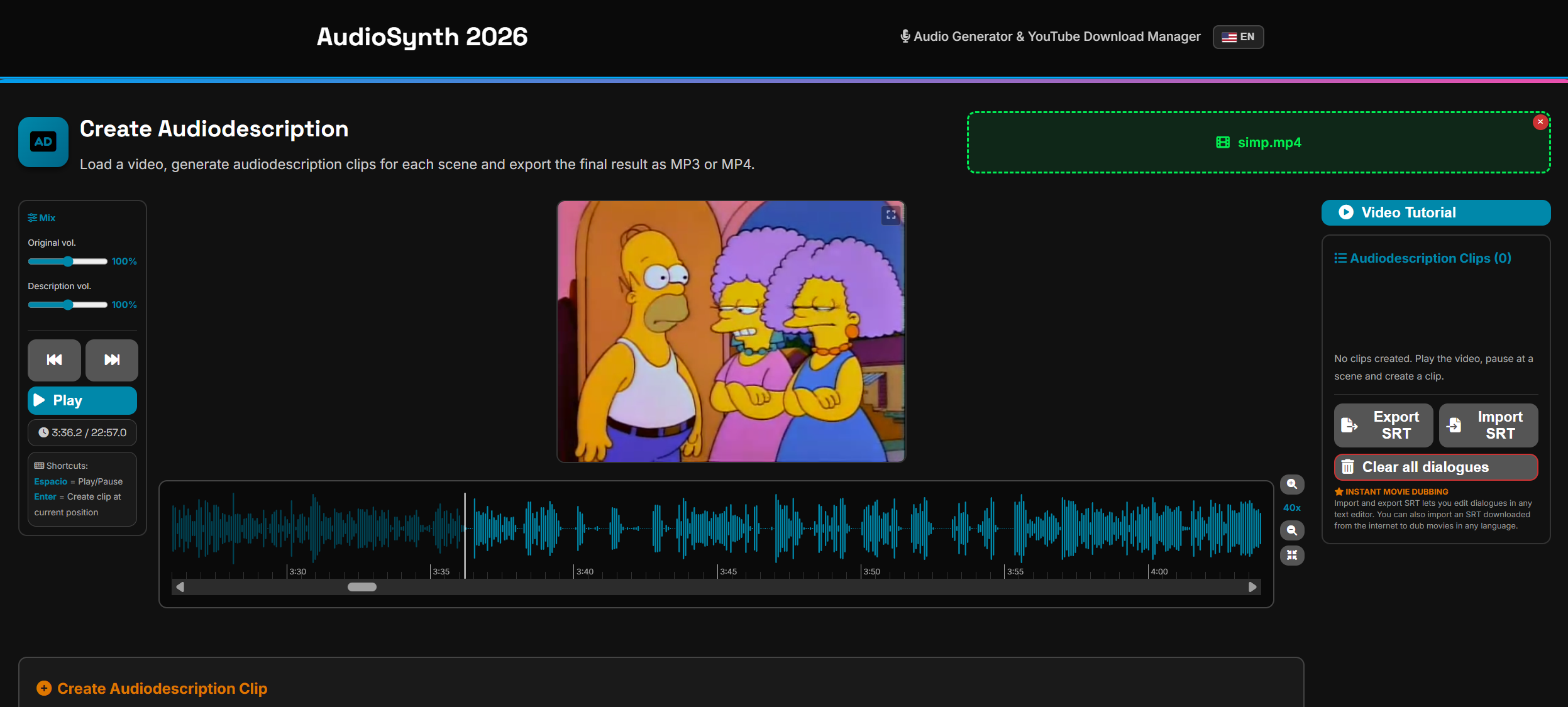
Load any video (MP4, MKV, AVI, WEBM), view the synchronized waveform and place synthetic voice narrations at the exact moments. Each clip can have its own voice, speed and volume. Export as MP4 (video) or MP3 (audio only). Save and resume projects anytime.
2. Automatic Subtitles and Dubbing
Generate automatic subtitles in multiple languages from any video using artificial intelligence. Includes a built-in subtitle editor to correct text and adjust timing. Generate simple automatic dubbing synchronized with the subtitles. Import and export SRT.
3. Book to Audio
Convert entire books (PDF, TXT, EPUB, DOCX) to audio with synthetic voice. Automatically detects chapters and generates MP3 files organized by chapter. Improved conversion engine for greater fidelity and speed.
4. Media Editor
Full audio and video editor with waveform: trim, delete sections, adjust volume (up to 200%), change speed, apply dynamic compression and merge multiple files. Visual selection with drag and markers. Now also allows cutting videos, extracting audio from video, and adjusting brightness and contrast.
5. Simple Text to Audio
Type or paste text and instantly convert it to MP3. Ideal for quick voiceovers, voice notes or study material.
6. System Audio Recorder
Record any sound playing on your computer (music, videos, calls). Includes real-time level meter, gain control and normalization.
7. YouTube Downloader
Download videos or audio only in the best available quality, with real-time progress. Includes built-in keyword search (no need to find the URL manually). Multiple download selector with a queue of up to 5 simultaneous downloads and YouTube subtitle extractor with a queue of up to 3 simultaneous extractions (limits to prevent YouTube blocking).
8. Movie and TV Show Synopses
Search titles and get synopses, cast, year and rating from TMDB. Useful for preparing audio descriptions with context.
General Features
*20 high-quality voices (14 in Spanish and 6 in English) with instant preview
*Bilingual interface (Spanish/English) with automatic language detection
*Accessible screen reader navigation (in testing phase): keyboard shortcuts for all functions, voice descriptions for each area, compatibility with NVDA and Windows Narrator
*Accessible design: high contrast, descriptive labels and large typography
*100% portable: no installation required, works from any folder or USB drive
*Works offline (only YouTube, automatic subtitles and synopses require an internet connection)
AudioSynth 2026, an all-in-one tool designed to add voices to audio and video, create audio descriptions, generate automatic subtitles and dubbing, create spoken tutorials, convert PDFs to speech and edit audio and video, with a strong focus on accessibility for visually impaired people.
Main Features
1. Create Audio Descriptions (main feature)
Load any video (MP4, MKV, AVI, WEBM), view the synchronized waveform and place synthetic voice narrations at the exact moments. Each clip can have its own voice, speed and volume. Export as MP4 (video) or MP3 (audio only). Save and resume projects anytime.
2. Automatic Subtitles and Dubbing
Generate automatic subtitles in multiple languages from any video using artificial intelligence. Includes a built-in subtitle editor to correct text and adjust timing. Generate simple automatic dubbing synchronized with the subtitles. Import and export SRT.
3. Book to Audio
Convert entire books (PDF, TXT, EPUB, DOCX) to audio with synthetic voice. Automatically detects chapters and generates MP3 files organized by chapter. Improved conversion engine for greater fidelity and speed.
4. Media Editor
Full audio and video editor with waveform: trim, delete sections, adjust volume (up to 200%), change speed, apply dynamic compression and merge multiple files. Visual selection with drag and markers. Now also allows cutting videos, extracting audio from video, and adjusting brightness and contrast.
5. Simple Text to Audio
Type or paste text and instantly convert it to MP3. Ideal for quick voiceovers, voice notes or study material.
6. System Audio Recorder
Record any sound playing on your computer (music, videos, calls). Includes real-time level meter, gain control and normalization.
7. YouTube Downloader
Download videos or audio only in the best available quality, with real-time progress. Includes built-in keyword search (no need to find the URL manually). Multiple download selector with a queue of up to 5 simultaneous downloads and YouTube subtitle extractor with a queue of up to 3 simultaneous extractions (limits to prevent YouTube blocking).
8. Movie and TV Show Synopses
Search titles and get synopses, cast, year and rating from TMDB. Useful for preparing audio descriptions with context.
General Features
*20 high-quality voices (14 in Spanish and 6 in English) with instant preview
*Bilingual interface (Spanish/English) with automatic language detection
*Accessible screen reader navigation (in testing phase): keyboard shortcuts for all functions, voice descriptions for each area, compatibility with NVDA and Windows Narrator
*Accessible design: high contrast, descriptive labels and large typography
*100% portable: no installation required, works from any folder or USB drive
*Works offline (only YouTube, automatic subtitles and synopses require an internet connection)
Requirements
Minimum Requirements
CPU: Intel i5 8th Gen / AMD Ryzen 3
RAM: 8 GB
GPU: No dedicated GPU (CPU only)
Storage: HDD with 10 GB free space
OS: Windows 10 (x64)
🔹 Recommended Requirements
CPU: Intel i7 10th Gen / AMD Ryzen 5 5000 or newer
RAM: 16 GB
GPU: NVIDIA GTX 1650 or newer / RTX 3050 or newer
Storage: SSD with 20 GB free space
OS: Windows 10 or 11 (x64)
CPU: Intel i5 8th Gen / AMD Ryzen 3
RAM: 8 GB
GPU: No dedicated GPU (CPU only)
Storage: HDD with 10 GB free space
OS: Windows 10 (x64)
🔹 Recommended Requirements
CPU: Intel i7 10th Gen / AMD Ryzen 5 5000 or newer
RAM: 16 GB
GPU: NVIDIA GTX 1650 or newer / RTX 3050 or newer
Storage: SSD with 20 GB free space
OS: Windows 10 or 11 (x64)
Verified on VirusTotal
View full report on VirusTotal
Safe & Virus-Free
This software is completely safe and contains no viruses or malicious code. Windows SmartScreen may show a "Windows protected your PC" warning when you run it — this is normal for programs that are not digitally signed with a paid certificate. Our programs are free, so we don't purchase code signing certificates. Simply click "More info" and then "Run anyway" to proceed.